Support
Install umbrelOS on your own hardwareUpdated October 5, 2026
Installing umbrelOS on amd64
Install umbrelOS on any Intel or AMD mini PC, desktop, or server
umbrelOS runs on most amd64 hardware, including mini PCs, desktops, laptops, and servers with a 64-bit Intel or AMD processor. See Running umbrelOS on your own hardware for what to expect.
Minimum requirements
- CPU: Dual-core 64-bit Intel or AMD (quad-core or higher recommended)
- RAM: 4 GB (8 GB+ recommended)
- Storage: 32 GB for umbrelOS, plus any internal drives you want to use for apps and data
- Firmware: UEFI, with Secure Boot turned off
- Network: An ethernet connection to your router for setup. You can switch to Wi-Fi afterwards.
Choose where umbrelOS will live
umbrelOS boots from one drive and uses the rest of your drives for apps and data.
- Your device has onboard storage (eMMC). Install umbrelOS on the eMMC. Follow Install on onboard storage or an internal drive.
- Everything else. Run umbrelOS from a USB drive, even if your device has a single internal drive. Follow Run from a USB drive.
- You'd rather not keep a USB drive plugged in. Install umbrelOS onto an internal drive. umbrelOS then shares that drive with your apps and data, and that drive can't be part of a Storage Manager pool. Follow Install on onboard storage or an internal drive.
Run from a USB drive
- Download the latest umbrelOS image for amd64.
- Download and install Balena Etcher on your computer. If it shows an error or says the file is corrupted, use Raspberry Pi Imager instead (see If something goes wrong).
- Connect a USB drive with at least 32 GB of space (it will be erased). A USB SSD is ideal, and a good-quality USB stick also works.
- Open Balena Etcher, select the umbrelOS image, select your USB drive, and flash it.
- Plug the USB drive into your device, connect an ethernet cable to your router, and power on.
- The device should boot from the USB drive. If it doesn't, set USB as the first boot option in your BIOS settings. Leave it that way, since umbrelOS boots from this drive every time.
- Wait about 5 minutes for the first boot to complete, then open http://umbrel.local in your browser. If your device has internal drives, umbrelOS will ask how you want to use them.
Install on onboard storage or an internal drive
- Download the latest umbrelOS USB installer.
- Download and install Balena Etcher on your computer. If it shows an error or says the file is corrupted, use Raspberry Pi Imager instead (see If something goes wrong).
- Connect a USB stick with at least 4 GB of space (it will be erased).
- Open Balena Etcher, select the umbrelOS ISO, select your USB stick, and flash it.
- Insert the USB stick into your device, connect a display and keyboard, an ethernet cable to your router, and power on.
- The device should boot from the USB stick. If it doesn't, you may need to adjust the boot priority in your BIOS settings.
- The installer will show a drive selection screen. Identify the drive by its capacity (the eMMC is usually the smallest one), enter the corresponding number, and confirm. Everything on that drive will be erased.
- Once installation is complete, power off the device and remove the USB stick, display, and keyboard.
- Power on the device. Wait about 5 minutes for the first boot to complete, then open http://umbrel.local in your browser. If your device has other internal drives, umbrelOS will ask how you want to use them.
Set up your storage
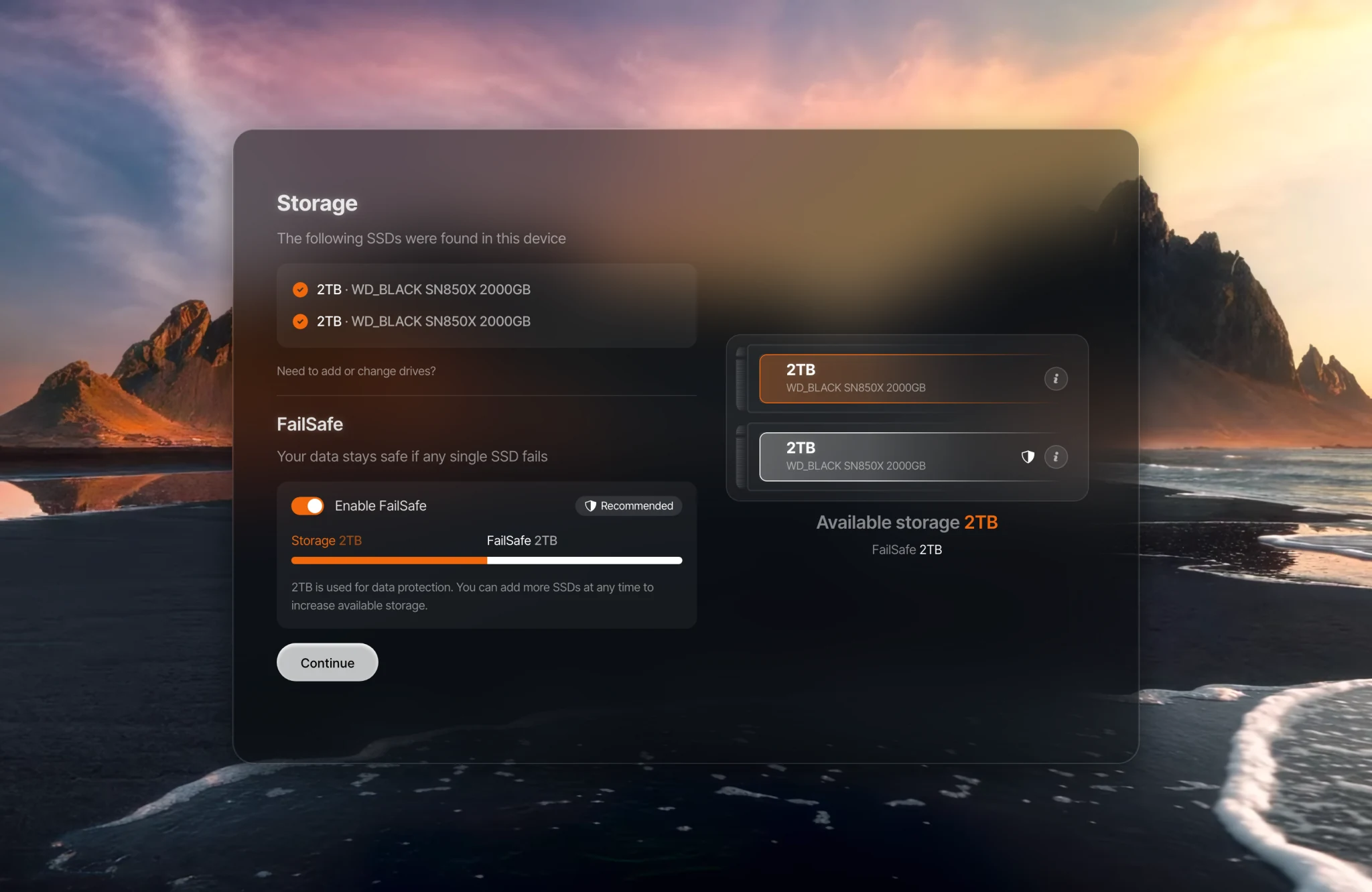
If your device has other internal drives, umbrelOS asks how you want to use them after you create your account. It lists the drives it found and lets you turn on FailSafe, so your data stays safe if a drive fails. The drive umbrelOS boots from isn't included. See Managing your storage for how FailSafe and Full Storage work.
If something goes wrong
- Balena Etcher shows an error or says the file is corrupted. Some versions of Balena Etcher fail to open or verify the umbrelOS file, most often on a Mac with the message "h.requestMetadata is not a function". Use Raspberry Pi Imager instead. Despite the name, it works for any device: choose Use custom as the operating system, pick the umbrelOS file you downloaded, choose your USB drive, and write it.
- Your device starts its old system instead of the USB drive. Connect a display and keyboard, and press Delete or F2 while it starts to open its BIOS settings. Make sure UEFI is on (turn off Legacy or CSM if there is one), turn Secure Boot off, and move the USB drive to the top of the boot order.
- You see "invalid signature" or "not authenticated" when starting from the USB drive. Secure Boot is on. Turn it off in your BIOS settings.
- umbrelOS only starts with the USB drive plugged in. That's how the umbrelOS image works: it runs from the USB drive and keeps your internal drives free for apps and data. To install umbrelOS onto a drive inside your device instead, use the USB installer and follow Install on onboard storage or an internal drive.
- A connected display shows a text login prompt. That's normal, and it means umbrelOS is running. You don't need to log in there: open http://umbrel.local in a browser on another device.
- Your device has no ethernet port. umbrelOS needs an ethernet connection for setup, so Wi-Fi alone isn't enough to get started. Once it's set up, you can switch to Wi-Fi.
See Connecting to your Umbrel if you need help accessing it.