

Accessing your Umbrel over HTTPS
Use https://umbrel.local, what the browser privacy warning means, and how to install the Umbrel certificate
You can open your Umbrel over both HTTP and HTTPS on your local network. Both addresses work at the same time:
Your apps work the same way. An app at http://umbrel.local:8080 is also available at https://umbrel.local:8080. You can also use your Umbrel's local IP address, or your own hostname if you've changed it.
HTTPS is there because some apps need it to work properly in the browser. It's for browser compatibility. It doesn't make your Umbrel reachable from outside your home. To reach your Umbrel privately from anywhere, use Tailscale.
Apps that need HTTPS
When you open an app that needs HTTPS, umbrelOS asks if you want to Open over HTTPS. Tick Always open these apps over HTTPS if you don't want to be asked again in that browser.
The browser privacy warning
The first time you open your Umbrel over HTTPS, your browser will probably show a privacy warning like "Your connection is not private". This happens because your Umbrel creates its own security certificate, and your browser doesn't know it yet.
For your Umbrel and its apps, it's safe to open the warning's details and choose the option to continue. Only do this for your Umbrel. Never do this on other websites, like your bank or email.
Install the Umbrel certificate (optional)
If you'd rather not see the warning, the owner can download your Umbrel's certificate and install it on the devices you use. Most people don't need to do this. A certificate changes what your phone, computer, or browser trusts, so only install it if you understand and accept that.
-
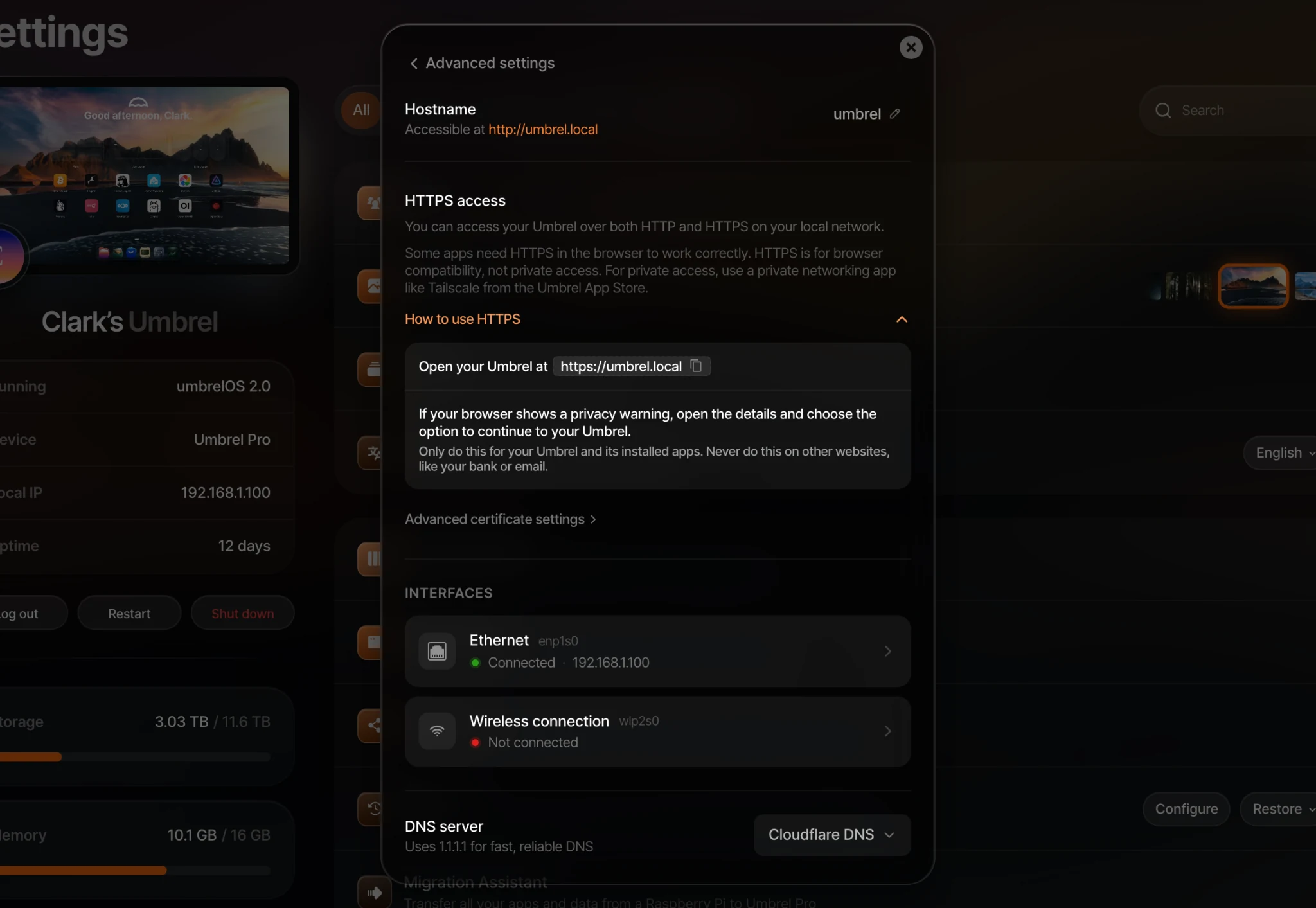
On the device you want to set up, open your Umbrel and go to Settings > Advanced settings > Network.
-
Under HTTPS access, click How to use HTTPS, then open Advanced certificate settings.
-
Under Set up on, choose your device (macOS, Windows, iOS, or Android) and follow the steps shown. They include clicking Download certificate and trusting the Umbrel Local HTTPS CA certificate.
-
Close and reopen your browser.
If you use Firefox, also turn on "Allow Firefox to automatically trust third-party root certificates you install" in Firefox's privacy settings, under Certificates.
The certificate covers umbrel.local, your custom hostname if you set one, and your Umbrel's local IP address. It doesn't cover Tailscale addresses, so you'll still see a warning over HTTPS through Tailscale.
When you need to install the certificate again
Your Umbrel creates a new certificate, and devices that trusted the old one will show the warning again, when:
- You click Reset certificate in Advanced certificate settings.
- You factory reset your Umbrel or restore it from a backup.
Install the new certificate on your devices to remove the warning.
Apps with their own HTTPS
A few apps, like Plex, use their own HTTPS addresses. If one of these apps doesn't load over HTTPS, open it over HTTP.